
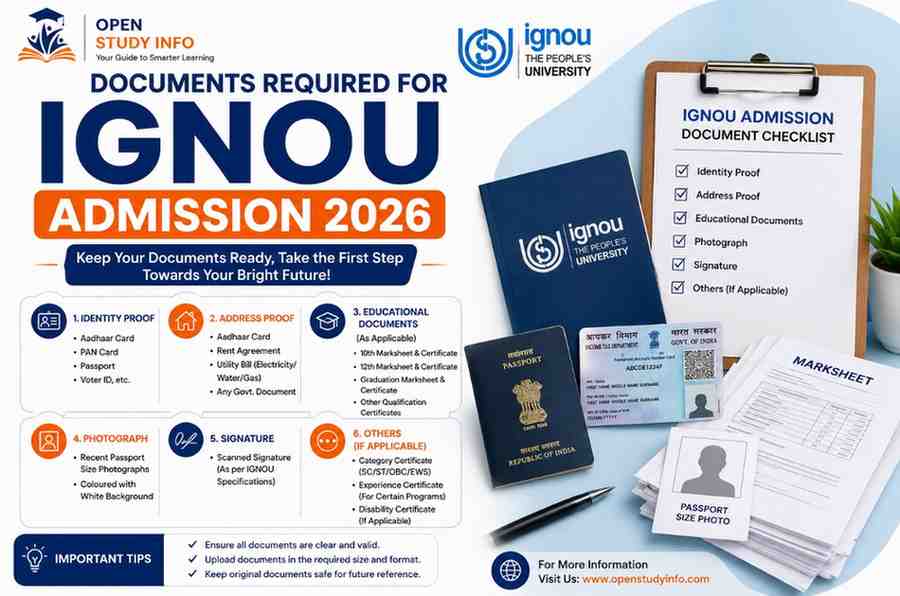
Preparing the right files before starting the IGNOU application can prevent avoidable delays. The exact list depends on your chosen programme and your personal category, but most applicants need a recent photograph, signature, educational certificates and identity-related details. This guide separates the documents required for most applicants from documents that are needed only in specific cases.
Quick IGNOU Admission Document Checklist 2026
The table below is a preparation guide. A document marked “conditional” should be uploaded only when it applies to your programme, category or claim.
| Document or detail | Who generally needs it? | What to check |
|---|---|---|
| Active email address and mobile number | All applicants | Use details you can access throughout admission. |
| DEB ID created through ABC ID | Students taking ODL/online admission | Enter the details exactly as required on the portal. |
| Recent photograph | All applicants | Clear, recent image that matches the live upload instructions. |
| Signature | All applicants | Clear signature on a plain background; crop excess space. |
| Age or date-of-birth proof | As requested by the portal | Name and date of birth must match the application. |
| Relevant educational qualification | All applicants | Class 12 for UG; qualifying degree/marksheets for PG; programme-specific proof where applicable. |
| Category certificate | SC/ST/OBC and other eligible claimants | Use the correct competent-authority certificate and valid format. |
| Disability certificate | Applicants claiming the applicable benefit | Upload only when relevant and ensure details are legible. |
| Experience, licence or employment proof | Only specified programmes | Follow the eligibility clause in that programme’s prospectus. |
| Name-change or identity-supporting proof | Applicants with mismatched names/details | Keep the appropriate legal/supporting record ready. |
DEB ID, ABC ID and APAAR: Understand the Difference
These terms are often mixed together, but they should not be treated as identical. For admission to an Open and Distance Learning or online programme, UGC-DEB requires the learner to create a DEB ID. The UGC-DEB system explains that the DEB ID is created using the student’s ABC ID. Follow the steps shown on the official DEB portal and then use the required ID details on the IGNOU application portal.
Document-by-Document Guide
1. Photograph and signature
Use a recent, clear photograph and a clean signature image. Avoid screenshots, blurred images, heavy filters and files with large empty borders. The name of the file does not establish its validity; clarity and compliance with the upload field matter.
2. Date-of-birth and identity details
Your name, date of birth and other personal details should be consistent across the application, DEB/ABC records and qualifying certificates. If your documents contain a genuine difference, keep the appropriate supporting proof ready instead of changing details casually in the form.
3. Educational qualification documents
For a bachelor’s programme, applicants generally need proof of the qualifying Class 12 or equivalent examination. For a master’s programme, the relevant graduation degree and/or marksheets may be required. Some programmes have subject, marks, professional qualification or experience conditions, so the eligibility section for the exact programme is more important than a generic checklist.
4. Category and benefit-related certificates
SC, ST, OBC and other certificates are conditional documents. Upload them only if you are claiming a category or benefit and ensure the certificate is issued by the competent authority in the required form. Similarly, a disability certificate is relevant when an applicant is claiming the applicable provision.
5. Experience or programme-specific proof
Work experience, a professional registration, an employer certificate or an entrance-related document is not required for every IGNOU course. These may apply to selected professional or special-intake programmes. Check the programme-specific eligibility and, where IGNOU publishes a separate prospectus or admission notice, follow that document.
6. Migration certificate
A migration certificate is not listed as a universal upload for every general IGNOU online admission. Do not arrange one merely because an unofficial checklist says it is compulsory. If your selected programme or a later verification message specifically requests it, follow that instruction.
Documents by Programme Level
| Programme type | Main qualifying proof | Possible additional proof |
|---|---|---|
| Undergraduate | Class 12/equivalent marksheet or certificate | Subject-specific eligibility, age or category proof where applicable |
| Postgraduate | Bachelor’s degree and/or relevant marksheets | Required subject, percentage, professional qualification or experience proof |
| Diploma/PG Diploma | The qualification stated for that diploma | Experience, employment or professional proof for selected programmes |
| Certificate | The minimum qualification stated for that certificate | Programme-specific document, if any |
| Special/entrance-based intake | Documents in the separate prospectus or notice | Entrance, counselling, experience, registration or reservation records as specified |
IGNOU Upload Format and File-Size Rules
Do not rely on one old or third-party file-size table. Upload requirements can differ by document and may change when the portal is updated. The format and maximum size displayed beside the live upload field should be treated as the final instruction.
| File | Preparation guidance | Final check |
|---|---|---|
| Photograph | Use a sharp portrait; crop unnecessary background. | Match the format and size stated beside the portal field. |
| Signature | Use a clear signature on a plain background. | Preview the uploaded file and confirm it is readable. |
| Certificates/marksheets | Scan the complete page; include all corners and relevant details. | Use the portal’s permitted format and maximum size. |
| Multi-page proof | Combine pages only if the portal permits one document upload. | Check page order and readability after compression. |
Checks Before You Submit the Admission Form
- Confirm that you selected the correct programme, regional centre and study centre options.
- Match your name, date of birth and parent details with your qualifying record.
- Verify the DEB ID and related details through the official system.
- Open every uploaded file and confirm it belongs to the correct field.
- Check that certificate numbers, marks, dates and issuing authority details are readable.
- Upload category, disability or experience proof only when it applies to your claim.
- Read the programme’s eligibility criteria before paying a non-refundable fee.
- Save the submitted form, payment acknowledgement and registration/control number.
If the application deadline is approaching, add it to the free Student Deadline Tracker and set your own earlier reminder. You can find the other calculators and checklists on the Student Tools Hub.
What to Do After Submission
Submission does not mean you should stop checking the application. Save your login details securely and monitor the admission dashboard, registered email and mobile number for any official message. If IGNOU flags a discrepancy, follow the correction or upload instructions displayed for your application. Do not assume that every rejected file will automatically receive an unlimited re-upload window.
Keep admission records in one folder because the same details may be useful later for the IGNOU assignment submission process, checking IGNOU assignment status and completing the IGNOU exam form.
Frequently Asked Questions
What are the main documents required for IGNOU admission 2026?
Most applicants should keep a recent photograph, signature, relevant educational qualification records and the required DEB/ABC details ready. Category, disability, experience and programme-specific documents are conditional.
Is DEB ID mandatory for IGNOU admission?
UGC-DEB states that a DEB ID is mandatory for learners enrolling in recognised ODL and online programmes. It is created using the learner’s ABC ID. Follow the official portal instructions for the current process.
Are APAAR ID, ABC ID and DEB ID the same?
No. They should not be entered interchangeably. The UGC-DEB process uses an ABC ID to create a DEB ID for ODL/online admission. Verify each required detail through the official system.
What is the photograph or certificate upload size for IGNOU?
Use the format and maximum file size shown beside each upload field on the live IGNOU portal. Avoid relying on a universal size quoted by an old or unofficial article because portal requirements can change.
Is a migration certificate compulsory for IGNOU admission?
It is not a universal upload for every general IGNOU online admission. Follow the eligibility and document instructions for your selected programme and any later official verification request.
Do all applicants need a category or experience certificate?
No. A category certificate is relevant when claiming the applicable category or benefit. Experience or professional proof is needed only when the chosen programme’s eligibility conditions require it.
Can I edit or re-upload a document after submitting the form?
That depends on the facility or discrepancy notice available for your application. Check the admission dashboard and official messages, then follow the displayed correction instructions or contact the official helpdesk.
Where should I check the latest IGNOU admission deadline?
Check the official IGNOU admission portal and IGNOU announcements page. Third-party pages can help explain the process but should not replace the latest official notice.
Final Advice
Create a folder before starting the application, name every file clearly and compare each upload with the programme’s eligibility rules. The safest approach is simple: use this checklist for preparation, but treat the live IGNOU portal, the current prospectus and programme-specific notices as final.